Kasa Smart Light Bulbs, Full Color Changing – Features & Prices in Saudi Arabia :
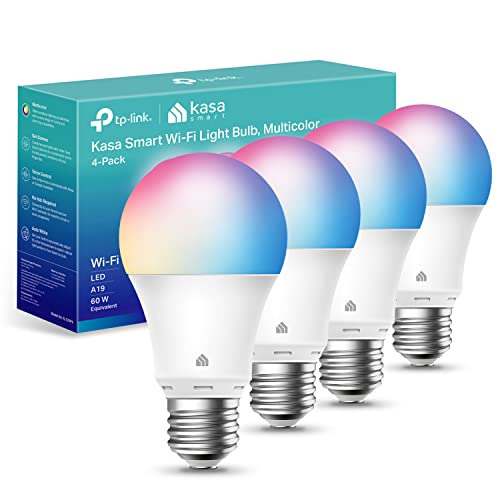
Kasa Smart Light Bulbs, Full Color Changing Dimmable Smart WiFi Bulbs Compatible with Alexa and Google Home, A19, 9W 800 Lumens,2.4Ghz only, No Hub Required, 4-Pack, multicolor (KL125P4)
Brand
Kasa Smart
Light Type
LED
Special Feature
Dimmable, Auto White, Energy Monitoring, Tunable
Wattage
9 watts
Bulb Shape Size
A19
Bulb Base
E26
Light Color
RGB
Voltage
120 Volts
Unit Count
4.0 Count
Color Temperature
6500 Kelvin
Number of Items
1
Luminous Flux
800 Lumen
Shape
a19
Material
Plastic
Size
4 Count (Pack of 1)
Model Name
KL125P4
Connectivity Technology
Wi-Fi
Indoor/Outdoor Usage
Indoor
Controller Type
Vera, Google Assistant, Amazon Alexa, iOS, Android
Test video – Kasa Smart Light Bulbs, Full Color Changing :
Product highlights :
Multicolor & Auto White: Dimmable 16 million colors and warm to cool whites(2500K-6500K). Set your bulb to automatically adjust its color temperature to match natural light patterns from dawn to dusk. Explore endless lighting possibilities to create your favorite light effects for everything from a dinner party to a late-night study session. Great for holiday decorations.
Voice Control: Get hands-free control of your lights with your voice via Amazon Alexa or Google Assistant. Perfect for times when your hands are full or entering a dark room.
Remote Control: Control your smart light bulb from anywhere with your smartphone using the free Kasa smart app (iOS, Android); Dim, turn on or off or change the colors of your light bulb remotely at your fingertips.
Energy Monitoring & Scheduling: Monitor real-time energy usage. Drive down energy consumption without losing quality (60 W equivalent). Use timer or schedules to set your lights to automatically turn on and off whenever you want, such as waking up with a soft glow in the morning with sunrise offset.
Trusted & Reliable: Kasa is trusted by over 6 Million users. UL certified for safety use. 2-year warranty. Require 2.4GHz Wi-Fi network connection.
Questions & Answers – Kasa Smart Light Bulbs, Full Color Changing :
➕ What is the price of Kasa Smart Light Bulbs, Full Color Changing in Saudi Arabia ?
The price of Kasa Smart Light Bulbs, Full Color Changing in-store is 110 SAR VAT.
➕ When Kasa Smart Light Bulbs, Full Color Changing was released ?
The release date was .
➕ What is the price of Kasa Smart Light Bulbs, Full Color Changing cheap used ?
The price of Kasa Smart Light Bulbs, Full Color Changing used is 70 SAR VAT.
➕ What are the main characteristics of Kasa Smart Light Bulbs, Full Color Changing ?
Special specifications :
Multicolor & Auto White: Dimmable 16 million colors and warm to cool whites(2500K-6500K). Set your bulb to automatically adjust its color temperature to match natural light patterns from dawn to dusk. Explore endless lighting possibilities to create your favorite light effects for everything from a dinner party to a late-night study session. Great for holiday decorations.
➕ Is it interesting to buy this product ?
The best people who can answer you are customers who have already bought and tested this product (See Customer Reviews). This product is rated 4.6 / 5 on Amazon.
➕ Where to buy Kasa Smart Light Bulbs, Full Color Changing in Saudi Arabia ?
Technical specifications – Kasa Smart Light Bulbs, Full Color Changing :
Brand
Kasa Smart
Light Type
LED
Special Feature
Dimmable, Auto White, Energy Monitoring, Tunable
Wattage
9 watts
Bulb Shape Size
A19
Purchase advice :
Warranty :
Check the duration of the warranty and also the faults and defects it covers. Is it complete or limited? and What is included in the warranty (parts, repairs or both)?
Shipping :
Is delivery offered? And how long does it take to get delivered (Delivery time)
Proof of purchase :
Does the shop give you an invoice ?
After-sales service :
Do they have an after-sales service to have information about the installation or operation (instructions for use). Also in case of problem, it is the seller who takes charge or you must contact the manufacturer or supplier yourself.
_____________________________
10 reviews for Kasa Smart Light Bulbs, Full Color Changing
Rated 4 out of 5
L. F (verified owner)–
How I fixed connectivity between internet and third bulb on iPhone – I was excited to get these bulbs to put in the three fixtures hanging over my kitchen island. I already have six Kasa outlets, so I have the Kasa app. The first two bulbs of my four-pack connected easily. Then number three ………. I tried over and over and it would not connect to my wifi. I tried switching to bulb four in the pack and moving the bulb to a lamp right next to my router. Still no connectivity.
Rated 5 out of 5
M. P (verified owner)–
4 pack bulbs – After reading reviews, I was pretty nervous about ordering these seems how some people made it seem like a lottery order with quite a few different complaints. That could still be the case. Several people mentioned black or white bottom bulbs, but I’m still not sure what that means, since I didn’t see anyone who mentioned them post a picture of the different kinds they were talking about.
Rated 5 out of 5
H. I (verified owner)–
works great, with one issue – So i thought the WiFi would have been the issue since that is the most common complaint. I think I am going to have to blame that on people that have cheap home WiFi and or do not know how to set up best practice for IOT and a separate WiFi for your IOT and then bridging the networks. I do have an overkill Network setup in my home. and i do use TP Link Omada Access Points and a TP Link Omada Controller for my wireless. and my router/DHCP controller/firewall is a Qhora. With this set up, i NEVER lose connectivity or need to power them on and off. i have 12 of these bulbs and never had a single one lose their connection.
Rated 5 out of 5
M. P (verified owner)–
4 pack bulbs – After reading reviews, I was pretty nervous about ordering these seems how some people made it seem like a lottery order with quite a few different complaints. That could still be the case. Several people mentioned black or white bottom bulbs, but I’m still not sure what that means, since I didn’t see anyone who mentioned them post a picture of the different kinds they were talking about.
T. O (verified owner)–
– After reading many reviews, I had concluded that the Kasa bulbs were a viable alternative to the Phillips Hue bulbs which are pricey in comparison. My only concern was the few reviews which commented on the brightness and setup. I found my experience to be quite the opposite as the setup was easy and the brightness is better than my current LED bulbs. I also set up my Alexa cube to control the bulbs and to group them so I could command it to shut off the lights on entire floors at once. Here’s some helpful tips: 1) make sure your light switches are set to off when you put the smartbulb in. If you forgot to turn it off and are having troubles pairing the lights to the app then turn the switch off and on 5 times and the bulbs should flash 3 times indicating they’re ready to pair, 2) if you have an issue with brightness, try commanding Alexa to turn the bulbs to 100% brightness or use the Kasa app to increase the brightness. In conclusion, this is a great purchase and I’d highly recommend it to anyone.
Rated 5 out of 5
K. I (verified owner)–
A slight learning curve, but works seamlessly with Alexa once you figure it out. – I’m using these bulbs for my bedside lamps, so I don’t need a ton of bright light, nor do I want it. These are capable of medium brightness, and obviously you can change them as well. After a little bit of set up, I was easily able to set them up with voice commands. If you want multiple bulbs to turn on at the same time and do the same things, like changing colors for example, then you should set up a group in the Kasa app and also set up a group in the Alexa app. You want to set up multiple lights (to work in sync with each other) in their own specific light group, not clumped together in some other room’s group. The key is to make a group in the both apps. Overall, very happy with these lightbulbs. I should’ve bought them a long time ago.
Rated 4 out of 5
L. F (verified owner)–
How I fixed connectivity between internet and third bulb on iPhone – I was excited to get these bulbs to put in the three fixtures hanging over my kitchen island. I already have six Kasa outlets, so I have the Kasa app. The first two bulbs of my four-pack connected easily. Then number three ………. I tried over and over and it would not connect to my wifi. I tried switching to bulb four in the pack and moving the bulb to a lamp right next to my router. Still no connectivity.
Rated 5 out of 5
K. I (verified owner)–
A slight learning curve, but works seamlessly with Alexa once you figure it out. – I’m using these bulbs for my bedside lamps, so I don’t need a ton of bright light, nor do I want it. These are capable of medium brightness, and obviously you can change them as well. After a little bit of set up, I was easily able to set them up with voice commands. If you want multiple bulbs to turn on at the same time and do the same things, like changing colors for example, then you should set up a group in the Kasa app and also set up a group in the Alexa app. You want to set up multiple lights (to work in sync with each other) in their own specific light group, not clumped together in some other room’s group. The key is to make a group in the both apps. Overall, very happy with these lightbulbs. I should’ve bought them a long time ago.
T. O (verified owner)–
– After reading many reviews, I had concluded that the Kasa bulbs were a viable alternative to the Phillips Hue bulbs which are pricey in comparison. My only concern was the few reviews which commented on the brightness and setup. I found my experience to be quite the opposite as the setup was easy and the brightness is better than my current LED bulbs. I also set up my Alexa cube to control the bulbs and to group them so I could command it to shut off the lights on entire floors at once. Here’s some helpful tips: 1) make sure your light switches are set to off when you put the smartbulb in. If you forgot to turn it off and are having troubles pairing the lights to the app then turn the switch off and on 5 times and the bulbs should flash 3 times indicating they’re ready to pair, 2) if you have an issue with brightness, try commanding Alexa to turn the bulbs to 100% brightness or use the Kasa app to increase the brightness. In conclusion, this is a great purchase and I’d highly recommend it to anyone.
Rated 5 out of 5
H. I (verified owner)–
works great, with one issue – So i thought the WiFi would have been the issue since that is the most common complaint. I think I am going to have to blame that on people that have cheap home WiFi and or do not know how to set up best practice for IOT and a separate WiFi for your IOT and then bridging the networks. I do have an overkill Network setup in my home. and i do use TP Link Omada Access Points and a TP Link Omada Controller for my wireless. and my router/DHCP controller/firewall is a Qhora. With this set up, i NEVER lose connectivity or need to power them on and off. i have 12 of these bulbs and never had a single one lose their connection.
L. F (verified owner) –
How I fixed connectivity between internet and third bulb on iPhone – I was excited to get these bulbs to put in the three fixtures hanging over my kitchen island. I already have six Kasa outlets, so I have the Kasa app. The first two bulbs of my four-pack connected easily. Then number three ………. I tried over and over and it would not connect to my wifi. I tried switching to bulb four in the pack and moving the bulb to a lamp right next to my router. Still no connectivity.
M. P (verified owner) –
4 pack bulbs – After reading reviews, I was pretty nervous about ordering these seems how some people made it seem like a lottery order with quite a few different complaints. That could still be the case. Several people mentioned black or white bottom bulbs, but I’m still not sure what that means, since I didn’t see anyone who mentioned them post a picture of the different kinds they were talking about.
H. I (verified owner) –
works great, with one issue – So i thought the WiFi would have been the issue since that is the most common complaint. I think I am going to have to blame that on people that have cheap home WiFi and or do not know how to set up best practice for IOT and a separate WiFi for your IOT and then bridging the networks. I do have an overkill Network setup in my home. and i do use TP Link Omada Access Points and a TP Link Omada Controller for my wireless. and my router/DHCP controller/firewall is a Qhora. With this set up, i NEVER lose connectivity or need to power them on and off. i have 12 of these bulbs and never had a single one lose their connection.
M. P (verified owner) –
4 pack bulbs – After reading reviews, I was pretty nervous about ordering these seems how some people made it seem like a lottery order with quite a few different complaints. That could still be the case. Several people mentioned black or white bottom bulbs, but I’m still not sure what that means, since I didn’t see anyone who mentioned them post a picture of the different kinds they were talking about.
T. O (verified owner) –
– After reading many reviews, I had concluded that the Kasa bulbs were a viable alternative to the Phillips Hue bulbs which are pricey in comparison. My only concern was the few reviews which commented on the brightness and setup. I found my experience to be quite the opposite as the setup was easy and the brightness is better than my current LED bulbs. I also set up my Alexa cube to control the bulbs and to group them so I could command it to shut off the lights on entire floors at once. Here’s some helpful tips: 1) make sure your light switches are set to off when you put the smartbulb in. If you forgot to turn it off and are having troubles pairing the lights to the app then turn the switch off and on 5 times and the bulbs should flash 3 times indicating they’re ready to pair, 2) if you have an issue with brightness, try commanding Alexa to turn the bulbs to 100% brightness or use the Kasa app to increase the brightness. In conclusion, this is a great purchase and I’d highly recommend it to anyone.
K. I (verified owner) –
A slight learning curve, but works seamlessly with Alexa once you figure it out. – I’m using these bulbs for my bedside lamps, so I don’t need a ton of bright light, nor do I want it. These are capable of medium brightness, and obviously you can change them as well. After a little bit of set up, I was easily able to set them up with voice commands. If you want multiple bulbs to turn on at the same time and do the same things, like changing colors for example, then you should set up a group in the Kasa app and also set up a group in the Alexa app. You want to set up multiple lights (to work in sync with each other) in their own specific light group, not clumped together in some other room’s group. The key is to make a group in the both apps. Overall, very happy with these lightbulbs. I should’ve bought them a long time ago.
L. F (verified owner) –
How I fixed connectivity between internet and third bulb on iPhone – I was excited to get these bulbs to put in the three fixtures hanging over my kitchen island. I already have six Kasa outlets, so I have the Kasa app. The first two bulbs of my four-pack connected easily. Then number three ………. I tried over and over and it would not connect to my wifi. I tried switching to bulb four in the pack and moving the bulb to a lamp right next to my router. Still no connectivity.
K. I (verified owner) –
A slight learning curve, but works seamlessly with Alexa once you figure it out. – I’m using these bulbs for my bedside lamps, so I don’t need a ton of bright light, nor do I want it. These are capable of medium brightness, and obviously you can change them as well. After a little bit of set up, I was easily able to set them up with voice commands. If you want multiple bulbs to turn on at the same time and do the same things, like changing colors for example, then you should set up a group in the Kasa app and also set up a group in the Alexa app. You want to set up multiple lights (to work in sync with each other) in their own specific light group, not clumped together in some other room’s group. The key is to make a group in the both apps. Overall, very happy with these lightbulbs. I should’ve bought them a long time ago.
T. O (verified owner) –
– After reading many reviews, I had concluded that the Kasa bulbs were a viable alternative to the Phillips Hue bulbs which are pricey in comparison. My only concern was the few reviews which commented on the brightness and setup. I found my experience to be quite the opposite as the setup was easy and the brightness is better than my current LED bulbs. I also set up my Alexa cube to control the bulbs and to group them so I could command it to shut off the lights on entire floors at once. Here’s some helpful tips: 1) make sure your light switches are set to off when you put the smartbulb in. If you forgot to turn it off and are having troubles pairing the lights to the app then turn the switch off and on 5 times and the bulbs should flash 3 times indicating they’re ready to pair, 2) if you have an issue with brightness, try commanding Alexa to turn the bulbs to 100% brightness or use the Kasa app to increase the brightness. In conclusion, this is a great purchase and I’d highly recommend it to anyone.
H. I (verified owner) –
works great, with one issue – So i thought the WiFi would have been the issue since that is the most common complaint. I think I am going to have to blame that on people that have cheap home WiFi and or do not know how to set up best practice for IOT and a separate WiFi for your IOT and then bridging the networks. I do have an overkill Network setup in my home. and i do use TP Link Omada Access Points and a TP Link Omada Controller for my wireless. and my router/DHCP controller/firewall is a Qhora. With this set up, i NEVER lose connectivity or need to power them on and off. i have 12 of these bulbs and never had a single one lose their connection.