
Description
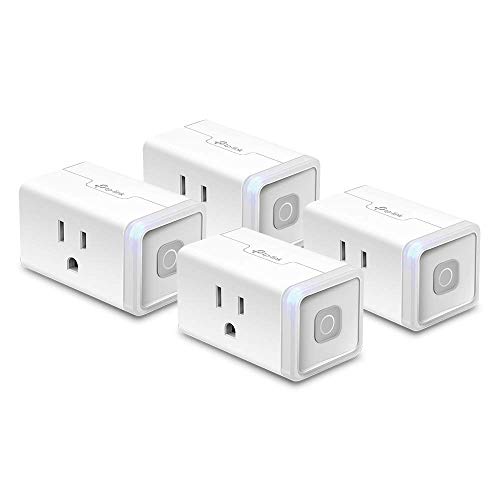
Kasa Smart Plug HS103P4, Smart Home Wi-Fi – Features & Prices in Saudi Arabia :
Kasa Smart Plug HS103P4, Smart Home Wi-Fi Outlet Works with Alexa, Echo, Google Home & IFTTT, No Hub Required, Remote Control, 15 Amp, UL Certified, 4-Pack, White
Manufacturer
TP-Link
Part Number
HS103P4
Item Weight
10.6 ounces
Product Dimensions
1.57 x 1.5 x 2.62 inches
Country of Origin
Vietnam
Item model number
HS103P4
Size
4 Count (Pack of 1)
Color
Indoor Plug 4-Pack
Style
Mini 4-Pack
Pattern
WiFi Outlet
Item Package Quantity
1
Number Of Pieces
4
Measurement Accuracy
0.1
Mounting Type
Plug-In Mount
Included Components
HS103 Smart Wi-Fi Plug Lite (4)
Batteries Included?
No
Batteries Required?
No
Warranty Description
2 year manufacturer
Test video – Kasa Smart Plug HS103P4, Smart Home Wi-Fi :
Product highlights :
Questions & Answers – Kasa Smart Plug HS103P4, Smart Home Wi-Fi :
Technical specifications – Kasa Smart Plug HS103P4, Smart Home Wi-Fi :
Brand
Kasa Smart
Style
Mini 4-Pack
Color
Indoor Plug 4-Pack
Item Dimensions LxWxH
1.57 x 1.5 x 2.62 inches
Included Components
HS103 Smart Wi-Fi Plug Lite (4)
Are Batteries Included
No
Item Weight
0.3 Kilograms
Purchase advice :
-
Warranty :
Check the duration of the warranty and also the faults and defects it covers. Is it complete or limited? and What is included in the warranty (parts, repairs or both)?
-
Shipping :
Is delivery offered? And how long does it take to get delivered (Delivery time)
-
Proof of purchase :
Does the shop give you an invoice ?
-
After-sales service :
Do they have an after-sales service to have information about the installation or operation (instructions for use). Also in case of problem, it is the seller who takes charge or you must contact the manufacturer or supplier yourself.
_____________________________
![[Pack of 100] Single Use Disposable Blue Face Mask](/wp-content/uploads/2023/05/51k8JL9QgbL-300x225.jpg)
G. K (verified owner) –
Setup was a headache and THEN I made a discovery! – Having owned a few iHome smart plugs, you would think setting up the TP Link Kasa WiFi Smart Plug Slim would be a breeze. Stay with me and I’ll explain so that you can actually complete the setup in a breeze as intended. I read the instructions, installed the Kasa app and attempted the setup only to get “Unable to add accessory. An unknown error occurred”. So I tried again and again with all four plugs. Nothing. Called Customer Care a couple times and they were so nice, bless their souls, but all we did was do everything I had already tried; vía the Kasa app, via the HomeKit app and even trying to complete the setup via the iPhone’s WiFi settings. The same error came up every time. THEN I got a call from one of the supervisors, Michael Adrian Catamco and off we went to try the same steps. We we’re getting the same error and THIS IS WHEN I HAD MY MOMENT OF CLARITY! I have dealt with many fuzzy touchy setups before and usually the problem is the one thing you would never think would be. I decided to perform the following steps and the setup worked like a charm:
G. K (verified owner) –
Setup was a headache and THEN I made a discovery! – Having owned a few iHome smart plugs, you would think setting up the TP Link Kasa WiFi Smart Plug Slim would be a breeze. Stay with me and I’ll explain so that you can actually complete the setup in a breeze as intended. I read the instructions, installed the Kasa app and attempted the setup only to get “Unable to add accessory. An unknown error occurred”. So I tried again and again with all four plugs. Nothing. Called Customer Care a couple times and they were so nice, bless their souls, but all we did was do everything I had already tried; vía the Kasa app, via the HomeKit app and even trying to complete the setup via the iPhone’s WiFi settings. The same error came up every time. THEN I got a call from one of the supervisors, Michael Adrian Catamco and off we went to try the same steps. We we’re getting the same error and THIS IS WHEN I HAD MY MOMENT OF CLARITY! I have dealt with many fuzzy touchy setups before and usually the problem is the one thing you would never think would be. I decided to perform the following steps and the setup worked like a charm:
T. K (verified owner) –
Pretty Good – The sale price I’ve been able to obtain these at is driving a lot of my high opinion on these plugs.
B. L (verified owner) –
These plugs are ok, depending on what you want to do – I recently had my house wired for a generator. I wanted to get a realistic idea of what each of my electrical devices draws, so I figured I’d get these plugs and let them run for awhile.
F. B (verified owner) –
Easy install, fantastic app – I love these!!! I love the app and all the icons you can choose from when labeling the device, I love how easy they are to set up, and when I use the app to turn off my devices, there is a very satisfying little click. It connected to my Google Home app without an issue and responds to all of my routines. For any reference I have these connected to 2 christmas trees and a lamp, not sure what to use the 4th for yet as the rest of our lights have smart bulbs and most devices (coffee pot, dyson fan, old tv) I would want to plug in still require the power button to be pressed on them. No fault to the plugs at all. I hope these last long and if they do, I will be purchasing more smart home products from Kasa
T. K (verified owner) –
Pretty Good – The sale price I’ve been able to obtain these at is driving a lot of my high opinion on these plugs.
F. B (verified owner) –
Easy install, fantastic app – I love these!!! I love the app and all the icons you can choose from when labeling the device, I love how easy they are to set up, and when I use the app to turn off my devices, there is a very satisfying little click. It connected to my Google Home app without an issue and responds to all of my routines. For any reference I have these connected to 2 christmas trees and a lamp, not sure what to use the 4th for yet as the rest of our lights have smart bulbs and most devices (coffee pot, dyson fan, old tv) I would want to plug in still require the power button to be pressed on them. No fault to the plugs at all. I hope these last long and if they do, I will be purchasing more smart home products from Kasa
R. R (verified owner) –
This Kasa/TP-Link product works great… easy install – Bought a 4 pack of TP-Link Smart Plug Minis…. at first I tried using them with My Alexa but found the Alexa app too cumbersome… and decided it was much easier to schedule on/off times through the Kasa app than fool with Alexa. I installed three of the four plugs at the same time and all worked fine… installed plug four some time later and or some reason it was not in the correct time zone… so on off times were out of sink. Did an on line chat with Jean at TP-Link support and the time zone issue was quickly resolved. Easy Peasey… very pleased. So far the plugs are performing flawlessly. Would certainly buy more TP-Link gear if needed… which by the way is the brand of my router. 🙂
R. R (verified owner) –
This Kasa/TP-Link product works great… easy install – Bought a 4 pack of TP-Link Smart Plug Minis…. at first I tried using them with My Alexa but found the Alexa app too cumbersome… and decided it was much easier to schedule on/off times through the Kasa app than fool with Alexa. I installed three of the four plugs at the same time and all worked fine… installed plug four some time later and or some reason it was not in the correct time zone… so on off times were out of sink. Did an on line chat with Jean at TP-Link support and the time zone issue was quickly resolved. Easy Peasey… very pleased. So far the plugs are performing flawlessly. Would certainly buy more TP-Link gear if needed… which by the way is the brand of my router. 🙂
B. L (verified owner) –
These plugs are ok, depending on what you want to do – I recently had my house wired for a generator. I wanted to get a realistic idea of what each of my electrical devices draws, so I figured I’d get these plugs and let them run for awhile.