LUMIMAN Smart Light Bulbs, WiFi Alexa Light – Features & Prices in Saudi Arabia :
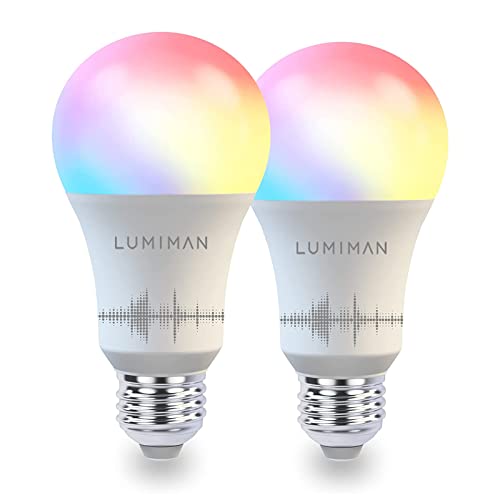
LUMIMAN Smart Light Bulbs, WiFi Alexa Light Bulb, LED Color Changing Dimmable Smart Bulb, Warm to Cool White A19 E26 7.5W 800LM, Works with Alexa Google Home, No Hub Required, 2 Pack
Brand
LUMIMAN
Light Type
LED
Special Feature
Dusk to Dawn, Timer Schedule, Music Sync, Works with Siri, Alexa, Echo, Google Home/ Mini, Group Control
Wattage
7.5 watts
Bulb Shape Size
A19
Bulb Base
E26
Incandescent Equivalent Wattage
60 Watts
Light Color
Multicolor
Voltage
120 Volts
Unit Count
2 Count
Color Temperature
2700 Kelvin
Item Package Quantity
2
Luminous Flux
800 Lumen
Shape
A19
Material
Plastic
Size
2 Count (Pack of 1)
Connectivity Technology
Wi-Fi
Indoor/Outdoor Usage
Indoor
Controller Type
Apple HomeKit, Google Assistant, Amazon Alexa
Style
Modern
Included Components
Bulb included
Power Source
AC/DC
Connectivity Protocol
Wi-Fi
Color Rendering Index
90
Manufacturer
LUMIMAN
Part Number
LM650-2P-CA
Item Weight
5.3 ounces
Product Dimensions
5.2 x 2.5 x 5 inches
Item model number
G2 TP120-9/A19 WiFi+BLE RGBCW OMNI
Is Discontinued By Manufacturer
No
Test video – LUMIMAN Smart Light Bulbs, WiFi Alexa Light :
Product highlights :
【Best Choice】LUMIMAN smart light bulbs are the best alternative to strip lights, with no harm to the wall. But do not use a dimmer to control the smart light bulbs.
【Energy Saving】At the same brightness, the smaller the wattage, the more energy efficient and environmentally friendly.
【Sync to Music】 Smart light bulb has 16 million colors, color changing with the music rhythm, a brilliant gift for Halloween and Christmas. It is an ideal choice for a party and creates multiple atmospheres.
【Hand Free】Works with Alexa, Echo dot, and Google Assistant for voice control, no hub required. (e.g., ‘Alexa, set the bedroom to purple’)
【Group Control】You can use the grouping function to create a group for one or several light bulbs and then activate all bulbs with one click. All groups can be shared with your family via email.
【Customize Scenes】Every color is dimmable and tunable; bright enough, you can set your preferred mode. And you can set up automatically turning on the led light bulbs at sunset and turning off the light bulbs at sunrise.
【Schedule/Timer】Set a timer if you always forget to turn off the color changing light bulb. Set schedules through the mobile APP to automatically turn on/off bulbs based on your routine.
➕ What is the price of LUMIMAN Smart Light Bulbs, WiFi Alexa Light in Saudi Arabia ?
The price of LUMIMAN Smart Light Bulbs, WiFi Alexa Light in-store is 70 SAR VAT.
➕ When LUMIMAN Smart Light Bulbs, WiFi Alexa Light was released ?
The release date was .
➕ What is the price of LUMIMAN Smart Light Bulbs, WiFi Alexa Light cheap used ?
The price of LUMIMAN Smart Light Bulbs, WiFi Alexa Light used is 40 SAR VAT.
➕ What are the main characteristics of LUMIMAN Smart Light Bulbs, WiFi Alexa Light ?
Special specifications :
【Best Choice】LUMIMAN smart light bulbs are the best alternative to strip lights, with no harm to the wall. But do not use a dimmer to control the smart light bulbs.
【Energy Saving】At the same brightness, the smaller the wattage, the more energy efficient and environmentally friendly.
➕ Is it interesting to buy this product ?
The best people who can answer you are customers who have already bought and tested this product (See Customer Reviews). This product is rated 4.3 / 5 on Amazon.
➕ Where to buy LUMIMAN Smart Light Bulbs, WiFi Alexa Light in Saudi Arabia ?
Check the duration of the warranty and also the faults and defects it covers. Is it complete or limited? and What is included in the warranty (parts, repairs or both)?
Shipping :
Is delivery offered? And how long does it take to get delivered (Delivery time)
Proof of purchase :
Does the shop give you an invoice ?
After-sales service :
Do they have an after-sales service to have information about the installation or operation (instructions for use). Also in case of problem, it is the seller who takes charge or you must contact the manufacturer or supplier yourself.
_____________________________
10 reviews for LUMIMAN Smart Light Bulbs, WiFi Alexa Light
Rated 4 out of 5
S. H (verified owner)–
Great bulbs, hiccups with programming and Alexa integration – These bulbs are pretty much exactly what I wanted. I had some difficulty setting them up because the bedroom sconce I ordered them for is for 2 bulbs on the same switch, and the auto programming kept getting confused about which bulb to program (you can’t program two at the same time, according to my experience). I ended up having to plug only one lightbulb in at a time to program. If you have a setup like that, I recommend setting each bulb up individually in a table lamp or something first, and then plugging them into your desired sockets later. This will work just fine and save you the hassle of having to unscrew and re-screw ceiling lights a bunch of times, like I did. It also took me a few tries to figure out how to program two lightbulbs to operate simultaneously in the same group, since as I said before, mine are both plugged into the same sconce. I finally did figure it out, but it would have been helpful if there were some specific instructions about how to do this, considering the bulbs come in pairs when you purchase. Maybe also a disclaimer in the instructions to set up each bulb individually, so people don’t waste their time like I did with multiple failed setups. Also be aware that you can only set these bulbs up on a 2.4 ghz wifi connection. This is my default wifi in my new house, but not my last apartment. I know some people have better internet and will have to make adjustments.
Rated 5 out of 5
P. R (verified owner)–
Best smart bulb I’ve tried – Ive tried maybe a dozen different smart bulbs over the years and these are the best. Purchased 3 times. First: set up is really easy. You go to your App Store and find the PlusMinus Smart Home app. Download and follow simple process. Takes about a minute. Here’s the good part: for some reason the app works EVEN WHEN MY WI-FI IS DOWN. I don’t know how. If Alexa won’t work due to “no internet”—which happens to me every day—I just use the PlusMinus app. Yes, these bulbs work with Alexa and Alexa automatically finds and adds them to your inventory so voice control works, too, as long as your wi-fi is up.
N. K (verified owner)–
– Good light but not compatible with Apple. Lumiman app doesn’t hold Siri voice commands but manual commands do work with Iphone. Unable to connect to Apple HomeKit. Disappointing and misleading. 🙁
Rated 4 out of 5
S. H (verified owner)–
Great bulbs, hiccups with programming and Alexa integration – These bulbs are pretty much exactly what I wanted. I had some difficulty setting them up because the bedroom sconce I ordered them for is for 2 bulbs on the same switch, and the auto programming kept getting confused about which bulb to program (you can’t program two at the same time, according to my experience). I ended up having to plug only one lightbulb in at a time to program. If you have a setup like that, I recommend setting each bulb up individually in a table lamp or something first, and then plugging them into your desired sockets later. This will work just fine and save you the hassle of having to unscrew and re-screw ceiling lights a bunch of times, like I did. It also took me a few tries to figure out how to program two lightbulbs to operate simultaneously in the same group, since as I said before, mine are both plugged into the same sconce. I finally did figure it out, but it would have been helpful if there were some specific instructions about how to do this, considering the bulbs come in pairs when you purchase. Maybe also a disclaimer in the instructions to set up each bulb individually, so people don’t waste their time like I did with multiple failed setups. Also be aware that you can only set these bulbs up on a 2.4 ghz wifi connection. This is my default wifi in my new house, but not my last apartment. I know some people have better internet and will have to make adjustments.
N. K (verified owner)–
– Good light but not compatible with Apple. Lumiman app doesn’t hold Siri voice commands but manual commands do work with Iphone. Unable to connect to Apple HomeKit. Disappointing and misleading. 🙁
Rated 4 out of 5
B. Z (verified owner)–
Great for the price – I’ve been using these light bulbs on and off since Christmas day, and have been both pleased and a little miffed by them and their app support. As long as you know what you’re getting out of the product, I do not think you’ll be disappointed.
Rated 4 out of 5
N. B (verified owner)–
Setup was a hassle, but good after – Setting this up almost ruined my entire weekend. I followed all the instructions, I have several other smart home devices, I am an engineer. I could not get these things to connect. I reset my entire Wi-Fi system and had to reconnect every other smart device in my house after all that, it still wouldn’t connect. Then I decided to try the Bluetooth tab as a last ditch effort and that worked. The Bluetooth tab is not mentioned in the instructions or troubleshooting section and when you look at it it looks like a specific type of lightbulb so I initially thought it was for a different product.
Rated 5 out of 5
P. R (verified owner)–
Best smart bulb I’ve tried – Ive tried maybe a dozen different smart bulbs over the years and these are the best. Purchased 3 times. First: set up is really easy. You go to your App Store and find the PlusMinus Smart Home app. Download and follow simple process. Takes about a minute. Here’s the good part: for some reason the app works EVEN WHEN MY WI-FI IS DOWN. I don’t know how. If Alexa won’t work due to “no internet”—which happens to me every day—I just use the PlusMinus app. Yes, these bulbs work with Alexa and Alexa automatically finds and adds them to your inventory so voice control works, too, as long as your wi-fi is up.
Rated 4 out of 5
B. Z (verified owner)–
Great for the price – I’ve been using these light bulbs on and off since Christmas day, and have been both pleased and a little miffed by them and their app support. As long as you know what you’re getting out of the product, I do not think you’ll be disappointed.
Rated 4 out of 5
N. B (verified owner)–
Setup was a hassle, but good after – Setting this up almost ruined my entire weekend. I followed all the instructions, I have several other smart home devices, I am an engineer. I could not get these things to connect. I reset my entire Wi-Fi system and had to reconnect every other smart device in my house after all that, it still wouldn’t connect. Then I decided to try the Bluetooth tab as a last ditch effort and that worked. The Bluetooth tab is not mentioned in the instructions or troubleshooting section and when you look at it it looks like a specific type of lightbulb so I initially thought it was for a different product.
S. H (verified owner) –
Great bulbs, hiccups with programming and Alexa integration – These bulbs are pretty much exactly what I wanted. I had some difficulty setting them up because the bedroom sconce I ordered them for is for 2 bulbs on the same switch, and the auto programming kept getting confused about which bulb to program (you can’t program two at the same time, according to my experience). I ended up having to plug only one lightbulb in at a time to program. If you have a setup like that, I recommend setting each bulb up individually in a table lamp or something first, and then plugging them into your desired sockets later. This will work just fine and save you the hassle of having to unscrew and re-screw ceiling lights a bunch of times, like I did. It also took me a few tries to figure out how to program two lightbulbs to operate simultaneously in the same group, since as I said before, mine are both plugged into the same sconce. I finally did figure it out, but it would have been helpful if there were some specific instructions about how to do this, considering the bulbs come in pairs when you purchase. Maybe also a disclaimer in the instructions to set up each bulb individually, so people don’t waste their time like I did with multiple failed setups. Also be aware that you can only set these bulbs up on a 2.4 ghz wifi connection. This is my default wifi in my new house, but not my last apartment. I know some people have better internet and will have to make adjustments.
P. R (verified owner) –
Best smart bulb I’ve tried – Ive tried maybe a dozen different smart bulbs over the years and these are the best. Purchased 3 times. First: set up is really easy. You go to your App Store and find the PlusMinus Smart Home app. Download and follow simple process. Takes about a minute. Here’s the good part: for some reason the app works EVEN WHEN MY WI-FI IS DOWN. I don’t know how. If Alexa won’t work due to “no internet”—which happens to me every day—I just use the PlusMinus app. Yes, these bulbs work with Alexa and Alexa automatically finds and adds them to your inventory so voice control works, too, as long as your wi-fi is up.
N. K (verified owner) –
– Good light but not compatible with Apple. Lumiman app doesn’t hold Siri voice commands but manual commands do work with Iphone. Unable to connect to Apple HomeKit. Disappointing and misleading. 🙁
S. H (verified owner) –
Great bulbs, hiccups with programming and Alexa integration – These bulbs are pretty much exactly what I wanted. I had some difficulty setting them up because the bedroom sconce I ordered them for is for 2 bulbs on the same switch, and the auto programming kept getting confused about which bulb to program (you can’t program two at the same time, according to my experience). I ended up having to plug only one lightbulb in at a time to program. If you have a setup like that, I recommend setting each bulb up individually in a table lamp or something first, and then plugging them into your desired sockets later. This will work just fine and save you the hassle of having to unscrew and re-screw ceiling lights a bunch of times, like I did. It also took me a few tries to figure out how to program two lightbulbs to operate simultaneously in the same group, since as I said before, mine are both plugged into the same sconce. I finally did figure it out, but it would have been helpful if there were some specific instructions about how to do this, considering the bulbs come in pairs when you purchase. Maybe also a disclaimer in the instructions to set up each bulb individually, so people don’t waste their time like I did with multiple failed setups. Also be aware that you can only set these bulbs up on a 2.4 ghz wifi connection. This is my default wifi in my new house, but not my last apartment. I know some people have better internet and will have to make adjustments.
N. K (verified owner) –
– Good light but not compatible with Apple. Lumiman app doesn’t hold Siri voice commands but manual commands do work with Iphone. Unable to connect to Apple HomeKit. Disappointing and misleading. 🙁
B. Z (verified owner) –
Great for the price – I’ve been using these light bulbs on and off since Christmas day, and have been both pleased and a little miffed by them and their app support. As long as you know what you’re getting out of the product, I do not think you’ll be disappointed.
N. B (verified owner) –
Setup was a hassle, but good after – Setting this up almost ruined my entire weekend. I followed all the instructions, I have several other smart home devices, I am an engineer. I could not get these things to connect. I reset my entire Wi-Fi system and had to reconnect every other smart device in my house after all that, it still wouldn’t connect. Then I decided to try the Bluetooth tab as a last ditch effort and that worked. The Bluetooth tab is not mentioned in the instructions or troubleshooting section and when you look at it it looks like a specific type of lightbulb so I initially thought it was for a different product.
P. R (verified owner) –
Best smart bulb I’ve tried – Ive tried maybe a dozen different smart bulbs over the years and these are the best. Purchased 3 times. First: set up is really easy. You go to your App Store and find the PlusMinus Smart Home app. Download and follow simple process. Takes about a minute. Here’s the good part: for some reason the app works EVEN WHEN MY WI-FI IS DOWN. I don’t know how. If Alexa won’t work due to “no internet”—which happens to me every day—I just use the PlusMinus app. Yes, these bulbs work with Alexa and Alexa automatically finds and adds them to your inventory so voice control works, too, as long as your wi-fi is up.
B. Z (verified owner) –
Great for the price – I’ve been using these light bulbs on and off since Christmas day, and have been both pleased and a little miffed by them and their app support. As long as you know what you’re getting out of the product, I do not think you’ll be disappointed.
N. B (verified owner) –
Setup was a hassle, but good after – Setting this up almost ruined my entire weekend. I followed all the instructions, I have several other smart home devices, I am an engineer. I could not get these things to connect. I reset my entire Wi-Fi system and had to reconnect every other smart device in my house after all that, it still wouldn’t connect. Then I decided to try the Bluetooth tab as a last ditch effort and that worked. The Bluetooth tab is not mentioned in the instructions or troubleshooting section and when you look at it it looks like a specific type of lightbulb so I initially thought it was for a different product.